
Running a retail shop today takes more than fast billing and a friendly smile. Customers expect quick checkouts, accurate invoices, multiple payment options, and the ability to receive digital receipts instantly. Retailers also need inventory control, stock alerts, and GST-ready invoicing — all without spending hours managing paperwork.
That’s where retail billing software comes in. The right system can automate your invoicing, reduce errors, simplify GST filing, and speed up operations.
This detailed guide explains the core features, pricing models, advanced capabilities, comparison tips, and a complete buyer’s checklist to help you choose the best billing software for your retail shop.
Who This Guide Is For
This guide is tailor-made for:
- Small retail shop owners
- Kirana stores and general stores
- Mobile, electronics, fashion, and pharmacy stores
- Multi-store chains & supermarket owners
- Kiosk operators and shop-in-shop counters
- Retailers shifting from manual billing or traditional registers
If you want a practical, cost-effective software that simplifies daily billing and inventory, this guide is for you.
Quick Glossary: Retail Billing Terms
Before we dive deeper, here are basic terms you’ll encounter:
- POS (Point of Sale): The checkout system where billing happens
- SKU: Unique code assigned to each product
- Barcode: Machine-readable code for fast scanning
- GST: Tax applied on invoicing (in India)
- Credit Note: Document for returns/refunds
- Batch/Lot: Product grouping (especially in FMCG/pharma)
- EOD Report: End-of-day sales summary
- FIFO/LIFO: Inventory valuation methods
Core Features Every Retail Billing Software Must Have
Retail billing software should do more than print invoices. It must improve speed, reduce errors, and give clarity on all business numbers.
1. Fast & Accurate Invoicing
The software must enable fast checkouts and error-free billing.
Key elements include:
- Barcode scanning for quick item addition
- Fast product search by name, SKU, or code
- Multiple invoice types (GST, non-GST, retail invoice)
- Customizable invoice formats
- Digital receipt sharing via SMS/WhatsApp/email
- Automatic tax calculations
A good billing interface should complete a sale in under 10 seconds.
2. Inventory Management Essentials
Inventory control is the backbone of retail.
A strong system should include:
- Live stock updates after each sale
- Low-stock and out-of-stock alerts
- Batch & expiry tracking (important for pharma/FMCG)
- Category and brand-wise product management
- Stock adjustment entries
- Purchase & stock inward records
This helps prevent stockouts and improves profit margins.
3. Payment Mode & Multi-Tender Support
Customers now prefer multiple payment options.
Look for:
- UPI, card, cash, wallet payments
- Payment terminal integrations
- Split payments (e.g., half cash + half UPI)
- Refunds and partial returns
- Daily cash drawer tracking
Multi-tender support improves customer convenience.
4. GST & Tax Compliance
Retail billing software must support:
- Automatic GST calculation
- HSN/SAC code mapping
- GSTR reports
- Tax-inclusive & tax-exclusive pricing
- Government-approved invoice format
- E-way bill & e-invoice compatibility (if needed)
This reduces tax filing headaches and prevents compliance errors.
5. Customer & Loyalty Features
Retail thrives on repeat customers.
Useful features include:
- Customer database
- Purchase history
- Credit ledger & outstanding tracking
- Loyalty points & discount rules
- Digital receipts & birthday promotions
These small add-ons help improve customer retention.
6. Reporting & Analytics
Reports help retailers make informed decisions.
Essential reports include:
- Daily/weekly/monthly sales
- Product-wise sales performance
- Category & brand performance
- Return/credit note reports
- Profit & margin analysis
- EOD (Day close) reports
- Staff-wise billing reports
Analytics ensure better stock planning and cashflow control.
Advanced Features (Optional But Great for Growth)
As your retail shop expands, these advanced features can help:
1. Multi-Store Management
For chains/outlets:
- Centralized stock
- Store-wise pricing
- Inter-store transfers
- Unified reporting dashboard
2. Offline Mode + Auto Sync
Retailers with unstable internet require offline billing.
The system syncs data automatically once online.
3. Purchase Order Management
- Create purchase orders
- Track supplier payments
- Manage inward stock
4. Barcode Label Designer
Create product labels with:
- Price
- MRP
- SKU
- Batch
5. Advanced Pricing Rules
- Bulk discounts
- Seasonal offers
- Customer-specific pricing
- BOGO offers
6. eCommerce Integration
Connect billing with:
- Shopify
- WooCommerce
- Marketplace inventory integrators
7. API Access
For custom integrations & automation.
Deployment Options & Accessibility
Retailers can choose one of two main types:
1. Cloud-Based Billing Software
Pros:
- Access anywhere
- Automatic updates
- Data backup
- Multi-device support
Cons:
-
Internet required for sync
2. On-Premise Desktop Software
Pros:
- Works fully offline
- One-time purchase
Cons:
- No automatic updates
- Manual backups
- Limited scalability
Tip: For small retail shops, cloud-based systems are easier and safer.
Integrations to Look For
- UPI & card payment gateways
- POS machines
- Barcode scanners & thermal printers
- Accounting tools (Tally/QuickBooks)
- Marketing tools (SMS/emails)
- Inventory management systems
- Loyalty & CRM apps
Integrations reduce manual effort and duplication.
Retail Billing Software Pricing Models Explained
Retail billing software pricing depends on features, users, and hardware needs.
1. Subscription-Based Pricing
Most modern apps use:
- Monthly plans (?299–?999 for basic users)
- Annual plans (10–20% cheaper)
Plans may vary by:
- User count
- Store count
- Number of invoices
- Advanced features
2. One-Time Purchase Cost
Traditional on-premise systems cost:
- Rs 10,000 – Rs 40,000 one-time
- Optional AMC charges per year
3. Per Terminal / Per Device Pricing
Useful for multi-counter shops.
4. Additional or Hidden Costs
Evaluate:
- Setup fees
- Training charges
- Barcode printer/scanner costs
- SMS charges
- Customization fees
- Integration costs
Tip: Always compare the total cost of ownership before choosing.
Buyer’s Checklist — How to Choose the Right Retail Billing Software
Use this practical checklist to evaluate options.
1. Speed & Efficiency
- Quick billing
- Barcode support
- Shortcuts
2. Inventory Fit
- Batch tracking
- Stock alerts
- Multi-location support
3. GST Compliance
- Automatic tax
- GSTR reports
- HSN mapping
4. Ease of Use
- Simple UI
- Quick learning curve
5. Support & Training
- Demo
- 24/7 support
- Video tutorials
6. Hardware Compatibility
- Barcode scanner
- Thermal printers
- POS machines
7. Data Security & Backup
- Regular backups
- Encryption
- Role-based access
8. Cost
- Subscription
- Hidden fees
- Hardware cost
Scoring Matrix
- 0 = Poor
- 1 = Average
- 2 = Good
- 3 = Excellent
Pick the software with highest score across 8 categories.
Implementation & Rollout Plan
A smooth setup ensures minimum downtime.
Before Installation
- Clean SKU list
- Verify pricing & tax
- Map categories & brands
- Confirm hardware compatibility
Pilot Phase (2–3 days)
- Test billing speed
- Test various payment methods
- Verify stock updates
Go-Live Day
- Train staff
- Keep manual backup ready
- Monitor first 50 invoices
First 30 Days
- Review EOD reports
- Adjust pricing rules
- Import missing SKUs
- Resolve workflow issues
Migration & Data Import/Export
Most modern billing systems provide:
- CSV or Excel import
- Category mapping
- Barcode mapping
- Customer & supplier data import
- Opening stock entry
Always test with a sample file before full import.
Security, Backup & Compliance
Look for:
- Data encryption
- Automated cloud backups
- Role-based access (cashier/manager/admin)
- Audit logs
- Compliant invoice formats
This protects business data and prevents unauthorized access.
ROI: How Billing Software Saves Money
Billing software increases profit through:
- Faster billing → more customers served
- Fewer errors → less loss
- Accurate stock → prevents overbuying
- Insights → better product planning
- Customer loyalty → more repeat business
Sample ROI formula:
If software costs ?800/month and saves ?5,000/month in time + errors,
ROI = (5000 - 800) / 800 = 525% monthly return
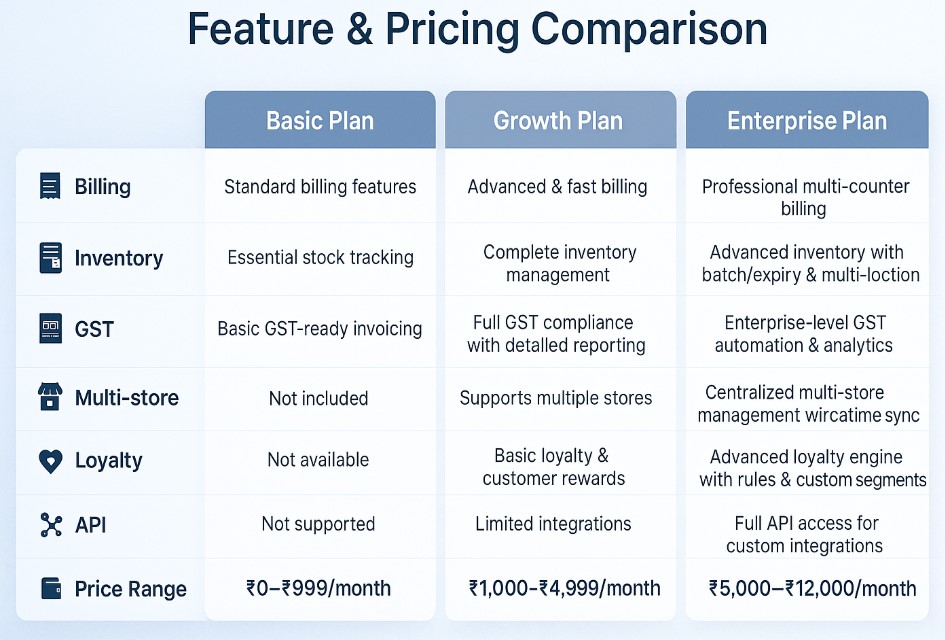
Feature & Pricing Example Table (Basic to Enterprise)
Case Study Example
A local mobile accessories shop shifted from manual billing to a cloud-based POS system.
Results after 3 months:
- Billing time reduced from 1 minute to 10 seconds
- Daily orders increased by 25%
- Inventory mismatch reduced from 18% to 3%
- Owner saved 2 hours daily previously spent on stock reconciliation
- GST filing became error-free
This demonstrates how software impacts both productivity and profitability.
FAQs
1. Do I need internet to run billing software?
Cloud software requires internet for syncing but most offer offline billing mode.
2. Can I use my existing barcode scanner and printer?
Yes, almost all scanners and 58mm/80mm thermal printers are supported.
3. How are returns and exchanges handled?
Through credit notes, reverse billing, or refund entries.
4. What happens to data if I change software?
Most systems allow CSV export so you can transfer billing, customer, and stock data.
5. Is GST always calculated automatically?
Yes — once HSN codes and tax slabs are mapped, the system handles it.
6. Can multiple staff members use the software?
Yes, through role-based access and user permissions.
7. What support should I look for?
Live chat, phone support, demo videos, and onboarding assistance.