
In today’s fast-paced business world, efficiency and accuracy are more than just buzzwords—they are essential for survival. One of the most critical aspects of financial operations is invoicing. While invoices may seem like routine paperwork, they are the lifeblood of a company’s cash flow. Delays or errors in invoice processing can lead to late payments, strained vendor relationships, and costly operational inefficiencies.
Traditionally, invoice management has been a manual process, involving stacks of paper, spreadsheets, and long email threads. Not only is this time-consuming, but it’s also prone to human error. According to studies, companies lose millions of dollars annually due to mismanaged invoices, duplicate payments, and late approvals.
Enter automated invoice management—a revolutionary approach that streamlines the entire invoicing process using software powered by AI, OCR, and workflow automation. In this guide, we will explore how automated invoice management works, its benefits, challenges, and why your business should consider implementing it today.
What is Automated Invoice Management?
Automated invoice management is the process of using specialized software to handle the entire lifecycle of invoices—from capture and validation to approval and payment—without extensive manual intervention. Unlike traditional systems that rely heavily on human input, automation leverages technology to improve accuracy, speed, and efficiency.
Key Differences Between Manual and Automated Invoice Management:
| Feature | Manual Invoice Processing | Automated Invoice Management |
|---|---|---|
| Data Entry | Manual typing of invoice details | OCR and AI extract invoice data automatically |
| Approval Workflow | Email chains or paper approvals | Digital routing with predefined rules |
| Error Handling | High risk of human errors | Automated validation and error detection |
| Payment Processing | Manual scheduling | Automatic payment processing and reconciliation |
| Reporting | Time-consuming, spreadsheet-based | Real-time dashboards and analytics |
Benefits at a Glance:
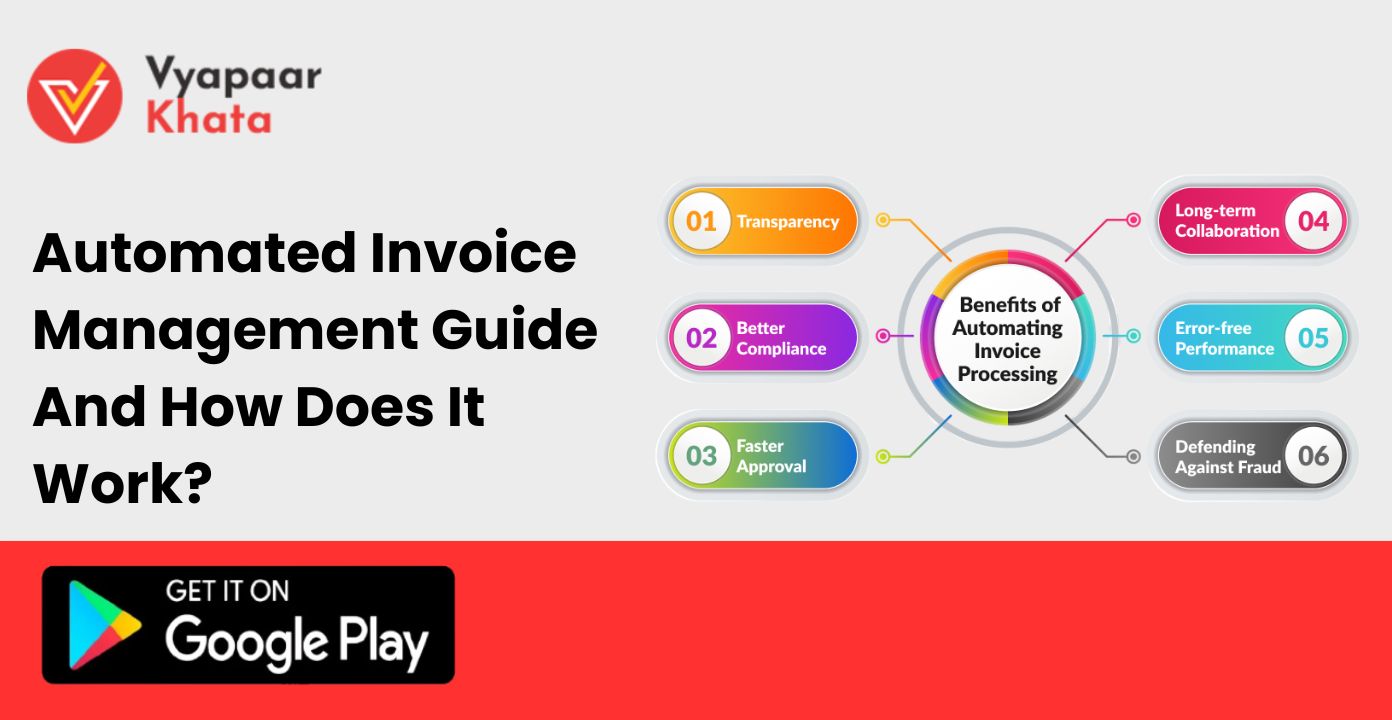
- Time savings: Automation reduces invoice processing time from days to hours.
- Cost reduction: Fewer manual resources are required.
- Improved accuracy: Reduces errors and duplicate payments.
- Better cash flow visibility: Real-time insights into payables and receivables.
How Automated Invoice Management Works
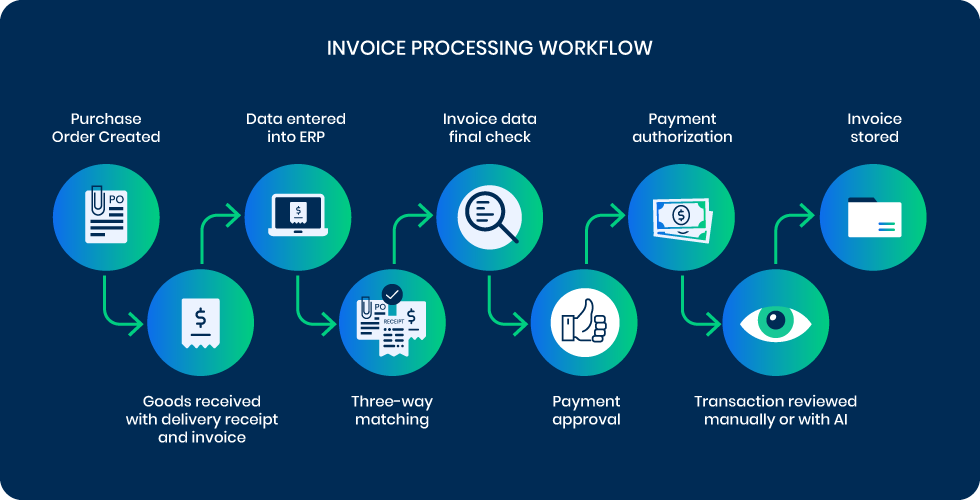
Automated invoice management works through a combination of technologies and structured workflows. Here’s a step-by-step breakdown:
1. Invoice Capture
The first step in the process is capturing invoice data. Businesses receive invoices in multiple formats—PDFs, emails, paper scans, or even handwritten forms. Manually processing these can be cumbersome, but automated systems streamline this step using:
- OCR (Optical Character Recognition): Converts printed or scanned documents into digital text.
- AI-based Data Extraction: Identifies key fields like invoice number, date, amount, vendor, and line items.
- Email Parsing: Automatically extracts invoice attachments from incoming emails.
For example, if a vendor sends a PDF invoice via email, an automated system can instantly read and extract the relevant data without any manual intervention.
2. Validation and Verification
Once invoices are captured, the next step is to ensure that the data is accurate and matches purchase orders or contracts. This step is critical to avoid errors and fraud.
Key Validation Steps:
- PO Matching: Compares invoice details with purchase orders to ensure consistency.
- Duplicate Detection: Identifies if the same invoice has been submitted previously.
- Fraud Detection: Flags unusual transactions or suspicious patterns.
AI and machine learning enhance the validation process by learning from historical data, improving accuracy over time, and reducing false positives.
3. Approval Workflow
After validation, invoices enter the approval workflow. Traditional workflows often rely on email chains or physical signatures, which can cause delays. Automated invoice management systems streamline this by:
- Routing invoices to the appropriate department or manager based on predefined rules.
- Sending reminders and notifications for pending approvals.
- Allowing digital approvals from desktop or mobile devices.
This ensures that invoices move quickly through the approval cycle, reducing bottlenecks and improving operational efficiency.
4. Integration with Accounting/ERP Systems
Automation doesn’t stop at invoice approval—it extends into your accounting or ERP system. Integration ensures:
- Automatic posting of invoices to the general ledger.
- Real-time updates on payables and expenses.
- Reduction in manual data entry and reconciliation errors.
For businesses using platforms like SAP, Oracle NetSuite, or QuickBooks, seamless integration is crucial to maintain accurate financial records.
5. Payment Processing
The final step is payment execution. Automated systems can:
- Schedule payments according to due dates or cash flow availability.
- Apply early payment discounts or prevent late fees.
- Generate an audit trail for compliance and transparency.
By automating payments, companies not only save time but also strengthen vendor relationships by ensuring timely settlements.
Key Features of Automated Invoice Management Systems
Modern invoice automation software comes equipped with a host of features designed to simplify and enhance financial operations:
- OCR and AI-based Invoice Data Extraction: Automatically reads invoices in multiple formats.
- Workflow Automation: Routes invoices according to predefined approval hierarchies.
- Multi-format Invoice Handling: Accepts PDF, email, scanned, and handwritten invoices.
- Integration with ERP/Accounting Software: Syncs invoice data with your financial system.
- Real-time Tracking and Reporting: Provides visibility into pending, approved, and paid invoices.
- Cloud Accessibility and Mobile Support: Enables approvals and management from anywhere.
- Compliance Management: Maintains audit trails and adheres to regulatory requirements.
Benefits of Using Automated Invoice Management
Investing in automated invoice management offers a variety of advantages:
- Cost Savings and Reduced Manual Labor
Automation reduces the need for manual data entry, allowing finance teams to focus on strategic tasks rather than repetitive paperwork. - Improved Accuracy and Fewer Human Errors
Automation minimizes errors caused by manual entry, including duplicate payments, incorrect amounts, or missed approvals. - Faster Invoice Processing and Approvals
Invoices move through validation, approval, and payment cycles much faster than traditional manual methods. - Enhanced Cash Flow Management
Real-time tracking of payables and receivables allows businesses to plan and manage cash flow effectively. - Better Vendor Relationships
Timely payments strengthen partnerships, improve trust, and can even lead to early payment discounts. - Scalability for Growing Businesses
Automated systems can handle high invoice volumes without additional staff, making them ideal for businesses of all sizes.
Common Challenges and How to Overcome Them
While automation offers numerous benefits, some challenges may arise during implementation:
- Resistance to Change
Employees may be hesitant to adopt new technology. Overcome this with proper training and clear communication about benefits. - Integration Issues
Legacy systems may not be compatible with new software. Plan for custom integrations or phased implementations. - Data Security Concerns
Protecting sensitive financial data is crucial. Ensure your system provides encryption, access controls, and audit logs. - Tips for Smooth Implementation:
- Choose software that fits your business size and needs.
- Implement automation gradually, starting with repetitive tasks.
- Monitor performance and adjust workflows as needed.
Choosing the Right Automated Invoice Management Solution
When selecting a system, consider:
- Business Size and Invoice Volume: Ensure the software can handle your current and projected workload.
- Integration Capabilities: Check compatibility with ERP and accounting systems.
- User-Friendliness: A simple interface encourages adoption.
- Customer Support: Reliable vendor support is critical for smooth operation.
- Pricing Model: Consider subscription vs. one-time purchase and hidden costs.
Case Studies / Examples
Example 1: Mid-Sized Retail Company
- Issue: Manual processing led to late payments and vendor complaints.
- Solution: Implemented automated invoice management.
- Result: Reduced processing time by 70%, eliminated duplicate payments, and improved vendor satisfaction.
Example 2: Manufacturing Firm
- Issue: High invoice volumes caused delays and accounting errors.
- Solution: OCR and AI-based automation integrated with ERP.
- Result: Achieved real-time reporting, faster approvals, and significant cost savings.
These examples illustrate how businesses across industries can benefit from automation.
Future of Automated Invoice Management
The future promises even more sophisticated capabilities:
- AI and Machine Learning Enhancements: Smarter validation, fraud detection, and predictive insights.
- Predictive Analytics for Cash Flow: Anticipate financial needs and optimize liquidity.
- End-to-End Automation: From invoice capture to payment reconciliation, entire processes could become fully autonomous.
- Cloud-Based Solutions: Greater accessibility, collaboration, and scalability.
Businesses adopting automation now will be better positioned to leverage these advancements for strategic advantage.
Automated invoice management is more than a technological upgrade; it’s a strategic investment that can transform financial operations. By reducing manual labor, improving accuracy, and speeding up approvals, automation ensures businesses maintain healthy cash flow, strengthen vendor relationships, and free up valuable resources for growth initiatives.
If your organization is still relying on manual processes, now is the time to explore automated solutions. With the right software, a smooth implementation plan, and ongoing monitoring, you can streamline your invoicing process and unlock significant operational benefits.
Start your journey toward automated invoice management today and take the first step in making your finance operations more efficient, accurate, and future-ready.
- Can automated invoice management handle multiple currencies?
Yes, most modern systems support multi-currency invoices and automatic conversion. - Is OCR 100% accurate?
Accuracy depends on document quality. AI-based systems continuously improve over time. - How secure is automated invoice storage?
Reputable systems use encryption, access controls, and cloud security standards to protect data. - Will automation replace my finance team?
No. Automation handles repetitive tasks, allowing your team to focus on strategic decision-making.