
In today’s business landscape — whether you’re a small startup, a freelancer, or a large enterprise — efficient invoice management is a foundational accounting and cash flow practice. Invoices represent sales, payments expected, and records of business transactions, making them central to financial stability and growth. Yet despite this importance, many organizations still rely on manual systems: spreadsheets, paper filing, or basic email communication — all of which are slow, error-prone, and difficult to scale.
Invoice management tools solve these challenges. By automating the creation, delivery, tracking, and reporting of invoices, these systems improve accuracy, save time, and optimize cash flow. In this guide, we’ll explore what invoice management tools are, why they matter, how to use them step by step, best practices, common pitfalls, and measurable benefits — all in clear, factual detail.
What Is an Invoice Management Tool?
An invoice management tool is software designed to support businesses in creating, sending, tracking, and organizing invoices digitally. Unlike manual invoice processes, these tools centralize financial workflows and enforce consistency.
At its core, an invoice management system:
- Provides digital templates for professional invoices.
- Automates calculation of totals, taxes, and discounts.
- Tracks the status of invoices — sent, viewed, paid, overdue.
- Integrates with payment methods like bank transfers, credit/debit cards, and digital wallets.
- Reports on financial metrics such as outstanding receivables and cash forecasts.
Invoice management systems may be offered as:
- Cloud-based Tools: Hosted online, accessible from any internet-connected device.
- On-Premises Software: Installed on business servers or computers.
- ERP Integrated Systems: Part of comprehensive enterprise resource planning platforms that handle accounting, purchasing, inventory, and reporting.
Cloud-based solutions are the most common today because they support remote access, real-time updates, automatic backups, and cross-platform integrations.
Why Manual Invoice Management Falls Short
Before digital tools became mainstream, businesses largely relied on manual methods such as:
- Word documents or Excel spreadsheets for invoice formatting.
- Emailing invoices individually to clients.
- Tracking payments using separate logs or paper files.
While this approach may work when operations are very small, several weaknesses become apparent even with moderate growth:
- Human Error: Manual entry increases risks of calculation errors, duplicate invoices, missing client details, or misapplied taxes.
- Time Drain: Designing individual invoices, entering line items, and following up manually consumes hours that could be spent on core work.
- Poor Tracking: Without automation, it’s difficult to monitor which invoices are unpaid or overdue across many clients.
- Inefficient Audit Trails: Paper or scattered files lack structured logs, making regulatory compliance or internal audits challenging.
- Cash Flow Risks: Delays in issuance or follow-ups slow payments, negatively impacting working capital.
In contrast, invoice management tools automate many tasks, reducing errors and streamlining workflows.
Core Features of Invoice Management Tools
Invoice management tools vary in complexity, but most include these core features:
Invoice Creation and Templates
Digital templates standardize invoices with fields for:
- Business name and contact
- Client details
- Itemized products/services
- Quantity, unit price, line item totals
- Subtotals, taxes, discounts, and final balances
- Payment terms and due dates
Templates enforce consistency and allow branding with logos and colors.
Automated Calculations
Sales tax, GST, VAT, and discounts are automatically calculated. This eliminates manual arithmetic and ensures compliance with tax laws.
Delivery and Messaging
Invoices can be delivered via:
- SMS links
- Client portal access
Some tools send friendly messages and personalized reminders.
Status Tracking
Real-time indicators show whether an invoice has been:
- Sent
- Delivered
- Opened/viewed
- Paid
- Overdue
These signals allow accounting teams to prioritize follow-ups.
Payment Integration
Many systems link directly with payment gateways, enabling clients to pay instantly via:
- Bank transfers
- Credit/debit cards
- Digital wallets
- UPI (in markets like India)
Automatic reconciliation reduces manual bookkeeping.
Recurring Billing
Subscription-based or repeat services can be invoiced automatically on set schedules.
Reports and Analytics
Dashboards provide insights into:
- Outstanding receivables
- Aging invoices (30/60/90+ days)
- Revenue by client or product
- Payment timing and patterns
These insights support financial decision?making.
Integration with Accounting Systems
Many tools integrate with accounting software like QuickBooks, Xero, Zoho Books, SAP, and Oracle. This seamless data exchange removes the need for duplicate entry.
Measurable Benefits of Using Invoice Management Tools
Adopting digital invoice management produces measurable improvements across operations:
Time Savings
Automating repetitive tasks such as creating, sending, and following up on invoices reduces administrative workload. This frees up staff to focus on strategic work.
Fewer Errors
Automated totals and predefined templates reduce calculation mistakes and mismatches in client records.
Faster Payments
Automated reminders and easy online payment links encourage clients to pay sooner, improving cash flow.
Better Compliance
Built-in tax logic ensures that GST, VAT, or other regional tax rates are applied correctly, supporting regulatory compliance.
Stronger Financial Insights
Real - time dashboards allow businesses to monitor outstanding invoices, forecast cash flow, and adjust credit policies based on trends.
Scalability
As business volume grows, digital systems scale easily without adding proportional staffing increases.
Step - by - Step Guide to Managing Invoices Using an Invoice Management Tool
Below is a practical walkthrough of setting up and managing invoices using an invoice management platform.
Step 1 — Choosing the Right Tool
When evaluating invoice management solutions, consider:
- Business size: Solo freelancer versus small team versus enterprise.
- Required features: Recurring billing, multi?currency support, and integrations.
- Ease of use: Clear interface, onboarding support.
- Pricing: Subscription models, free tiers, or per?invoice fees.
- Security: Data encryption and access controls.
- Customer support: Documentation, live support, training materials.
Write down your priorities and compare tools based on these criteria.
Step 2 — Setting Up Your Profile
Once a tool is chosen:
- Input business details: Legal name, address, contact information.
- Upload logo: For professional branding on all invoices.
- Add tax registration numbers: GST, VAT, or other identifiers required by law.
- Set default currency and language.
Doing this ensures consistency and compliance across invoices.
Step 3 — Adding Clients and Products/Services
Clients:
- Create a client directory with contact information, billing address, and payment preferences.
- Include tax IDs if required for B2B invoicing regulations.
Products/Services:
- Catalogue items with descriptions, SKUs, unit prices, and applicable tax codes.
- Group them logically (e.g., services, consumables, subscriptions).
This pre-configured database streamlines invoice creation.
Step 4 — Customizing Invoice Templates
Customization options usually include:
- Template layouts (single page, multi-line items, service descriptions)
- Header/footer messaging
- Terms and conditions fields
- Tax breakdown formatting
Tailor these to reflect your brand and contractual language.
Step 5 — Configuring Tax and Payment Settings
Different regions have varying tax laws:
- India: GST is prevalent; ensure correct rates for products/services.
- EU: VAT must be applied by the country of sale.
- US: Sales tax varies by state.
Set clear tax rules so that taxes are calculated automatically.
Payment Methods: Connect to platforms such as:
- Stripe
- PayPal
- Razorpay (common in India)
- Bank ACH or UPI links
This enables clients to pay directly from the invoice.
Step 6 — Issuing Invoices
When issuing an invoice:
- Select the client record.
- Add relevant items (products or services).
- Confirm quantities and pricing.
- Review automatic tax and total calculations.
- Set payment terms (e.g., Net 7, Net 30, due on receipt).
- Send via email, SMS link, or client portal.
The system logs delivery status for each invoice.
Step 7 — Tracking and Follow-Up
After sending:
- Use system dashboards to view status: sent, viewed, paid, or overdue.
- Many tools send automatic email reminders before and after due dates.
- For overdue accounts, configure escalation messages or tasks for your team.
This visibility enables proactive cash flow management.
Step 8 — Reconciling Payments
When payments arrive:
- If integrated with payment gateways, payments may auto-reconcile.
- Otherwise, apply payment manually and mark invoices as paid or partially paid.
- Reconciliation ensures your accounting records match actual inflows.
Step 9 — Reporting and Analysis
Invoice systems generate reports such as:
- Aging summaries showing overdue invoices by age category.
- Receivable dashboards highlighting total outstanding amounts.
- Revenue breakdowns by client, product, or period.
- Cash flow forecasts based on expected payment dates.
These reports support planning and financial strategy.
Best Practices for Efficient Invoice Management
To maximize effectiveness:
Standardize Invoice Terms
Use consistent net terms (e.g., Net 30), so clients know when payments are due.
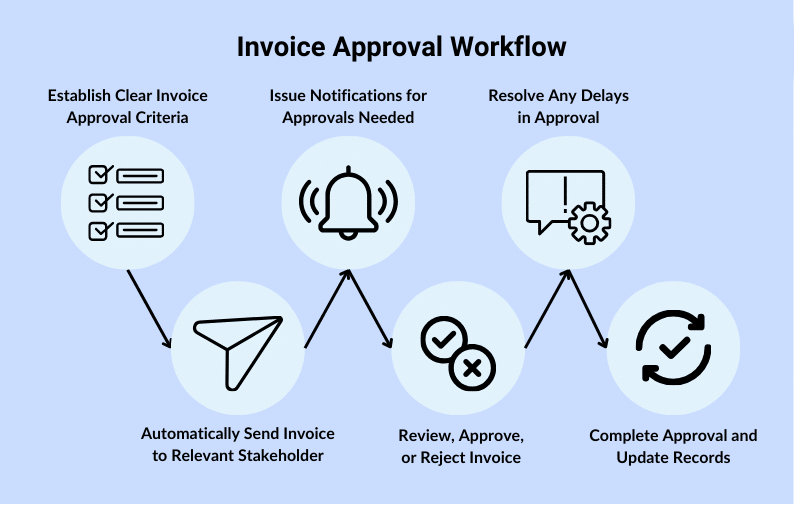
Build a Clear Approval Workflow
Have review steps before invoices are sent to avoid mistakes.
Monitor Aging Receivables
Track overdue invoices weekly and follow up immediately.
Encourage Digital Payments
Offer convenient payment links to encourage faster settlement.
Train Staff
Invest in training to ensure all accounting personnel use the tool consistently.
Maintain Backups
Even cloud systems benefit from periodic data exports for archival purposes.
Common Challenges and Solutions
Challenge: Late Payments
Solution:
- Offer multiple payment options.
- Send automatic reminders.
- Consider early payment discounts.
Challenge: Data Entry Errors
Solution:
- Use client and product databases.
- Avoid re - typing data; always select from lists.
Challenge: Integration Issues
Solution:
- Choose tools with robust API support.
- Validate financial data after syncing.
Challenge: Security Concerns
Solution:
- Use tools with encryption.
- Restrict access rights.
- Monitor login logs.
How Invoice Management Tools Fit into the Larger Financial Ecosystem
Invoice systems do more than send bills:
- They feed data into general ledgers and accounting software.
- They support audit compliance with logs and version history.
- They connect with purchasing and inventory systems for automated cost tracking.
- They support tax reporting with categorized tax data.
This integration makes invoice tools a cornerstone of digital finance operations.
Choosing the Right Invoice Management Tool
When evaluating options, consider:
| Evaluation Factor | Why It Matters |
|---|---|
| Ease of Use | Simplifies onboarding and reduces errors |
| Scalability | Supports growing transaction volumes |
| Integrations | Connects to accounting and payment systems |
| Security | Protects sensitive financial data |
| Customization | Matches branding and legal requirements |
| Cost Structure | Aligns with budget and usage levels |
Look for comprehensive documentation and trial periods to test before committing.
Effective invoice management is more than routine bookkeeping — it’s a strategic function that directly impacts cash flow, compliance, and business growth. By employing a dedicated invoice management tool, organizations eliminate manual inefficiencies, gain real - time financial visibility, and foster stronger relationships with clients through timely and accurate billing.
Modern invoice tools automate repetitive tasks, enforce consistent processes, minimize risk, and integrate seamlessly with broader financial systems. Whether you are a small business or a multinational enterprise, a robust invoice management strategy supported by the right tools is essential for operational excellence.
Evaluate your current invoice process, identify pain points, and explore solutions that fit your business needs. Investing in automation today can yield measurable gains in time, accuracy, and financial control tomorrow.