
A payslip is an official document provided by an employer that gives a detailed breakdown of an employee’s salary for a specific period, usually monthly. It shows how much you earn, how your salary is structured, and what deductions are applied before arriving at your final take-home amount.
Understanding how to calculate salary from a payslip is important because it helps you clearly know where your money is going. It allows you to verify if your salary is accurate, understand deductions like taxes and provident fund, and plan your finances better. Without this knowledge, employees often feel confused about why their in-hand salary differs from their offered CTC.
This guide is useful for:
- Employees who want to understand their earnings and deductions
- HR beginners learning payroll basics
- Job seekers comparing salary offers and compensation structures
What is a Payslip?
A payslip is a structured salary statement issued by an employer that outlines the complete details of an employee’s earnings and deductions for a specific pay cycle. It acts as an official record of the salary paid to an employee.
The key purpose of a payslip is to ensure salary transparency between the employer and employee. It provides a clear view of salary components such as basic pay, allowances, bonuses, and deductions like PF, ESI, and taxes. Additionally, it serves as proof of income, which is often required for applying for loans, credit cards, or visa processes.
Employees usually receive their payslips on a monthly basis, either in digital format (PDF via email or HR software) or as a printed document. Most modern organizations provide payslips through payroll systems or employee self-service portals, making them easy to access anytime.
Key Components of a Payslip
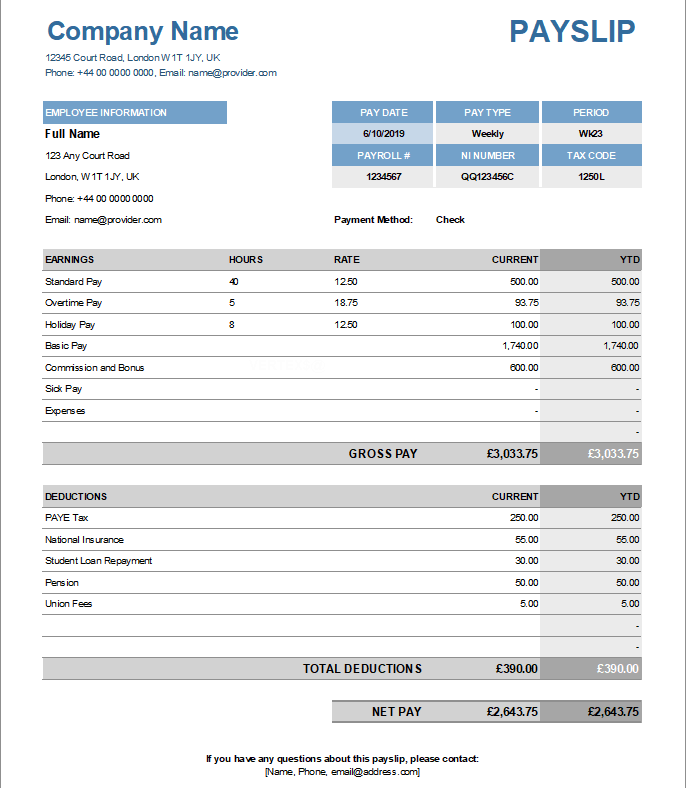
A payslip is mainly divided into three sections: Earnings, Deductions, and Net Salary. Understanding each part helps you clearly calculate your actual take-home salary.
Earnings (Income Components)
These are the amounts paid by the employer before any deductions.
- Basic Salary: The core component of your salary. It usually forms 30–50% of your total salary and is used to calculate other components like PF and HRA.
- House Rent Allowance (HRA): Provided to employees to cover rental expenses. It can offer tax benefits if you live in rented accommodation.
- Dearness Allowance (DA): Mainly given in government jobs to adjust for inflation and cost of living.
- Conveyance/Travel Allowance: Covers daily commuting expenses between home and workplace.
- Medical Allowance: Provided for healthcare-related expenses.
- Special Allowance: A flexible component added to balance the salary structure when other components are defined.
- Bonuses/Incentives: Performance-based or company-based rewards paid monthly, quarterly, or annually.
Deductions
These are the amounts subtracted from your total earnings.
- Provident Fund (PF)
A retirement savings contribution where both employee and employer contribute a fixed percentage. - Employee State Insurance (ESI)
Applicable to employees under a certain salary limit, providing medical and insurance benefits. - Professional Tax (PT)
A state-level tax deducted based on your salary slab. - Tax Deducted at Source (TDS)
Income tax deducted by the employer as per applicable tax rules. - Loan or Advance Deductions
Any repayments made towards salary advances or company loans.
Net Salary
- Definition of Take-Home Salary
Net salary is the final amount credited to your bank account after all deductions. - Difference Between Gross Salary and Net Salary
- Gross Salary = Total earnings before deductions
- Net Salary = Gross salary after subtracting all deductions
Important Salary Terms You Must Know
- Cost to Company (CTC)
The total amount a company spends on an employee in a year, including salary, benefits, PF contribution, bonuses, etc. - Gross Salary
The total earnings before deductions, including all allowances and bonuses. - Net Salary (In-hand Salary)
The actual amount received after all deductions. - Fixed vs Variable Pay
- Fixed Pay: Guaranteed monthly salary components
- Variable Pay: Performance-based incentives or bonuses that may vary
Step-by-Step Guide to Calculate Salary from Payslip
Follow these simple steps to calculate your salary:
Step 1: Identify Total Earnings
Add all the earning components listed in your payslip:
Basic Salary + HRA + Allowances + Bonuses
Step 2: Calculate Gross Salary
- Gross Salary = Total Earnings
Gross salary is the sum of all earnings before any deductions are applied.
Step 3: Identify Total Deductions
Add all deductions such as:
- PF + ESI + TDS + Professional Tax + Other deductions
Step 4: Calculate Net Salary
- Net Salary = Gross Salary - Total Deductions
This final amount is your take-home salary, which gets credited to your bank account each month.
Salary Calculation Formula
Salary calculation is actually very simple when broken into two main formulas:
- Gross Salary Formula
Gross Salary = Basic Salary + Allowances - Net Salary Formula
Net Salary = Gross Salary – Deductions
In simple words, first you add all your earnings to get the gross salary, and then subtract all deductions like PF, tax, and insurance to get your final take-home salary.
Example: How to Calculate Salary from a Payslip
Let’s understand salary calculation with a real-life example of a monthly payslip.
Sample Payslip Breakdown
Earnings:
- Basic Salary: ?20,000
- HRA: ?10,000
- Conveyance: ?2,000
- Special Allowance: ?3,000
Total Earnings (Gross Salary): ?35,000
Deductions:
- Provident Fund (PF): ?2,400
- Tax Deducted at Source (TDS): ?1,000
- Professional Tax: ?200
Total Deductions: ?3,600
Final Calculation
- Net Salary = 35000 - 3600
- Net Salary = 31400
Take-home Salary = ?31,400
How to Read Your Payslip Easily
Understanding a payslip becomes simple if you follow a structured approach:
Tips to quickly understand salary structure:
- Always start by checking gross salary and net salary
- Identify each earning component separately
- Look at deductions carefully (PF, TDS, etc.)
- Compare monthly changes in salary slips
What to check every month:
- Correct salary credit amount
- Any changes in allowances or deductions
- Tax deductions consistency
- PF contribution details
Common mistakes employees ignore:
- Not verifying small deduction changes
- Overlooking variable pay or bonuses
- Ignoring tax slab updates
Common Mistakes While Calculating Salary
Many employees miscalculate or misunderstand their salary due to common errors:
- Ignoring deductions: People often calculate only earnings and forget PF, tax, and other cuts.
- Confusing CTC with in-hand salary: CTC includes employer contributions, which are not part of take-home salary.
- Not checking variable components: Bonuses and incentives are often performance-based and not fixed.
- Misunderstanding tax deductions: TDS varies based on income slab and declarations, which affects net salary.
Why Your In-Hand Salary is Less Than CTC
Your take-home salary is always lower than your CTC due to several hidden factors.
Breakdown of hidden components:
CTC includes many elements that are not directly paid to you monthly.
Employer contributions:
- Employer’s PF contribution
- Gratuity provision
- Insurance and other benefits
These are part of CTC but not part of your monthly in-hand salary.
Tax impact:
Income tax (TDS) is deducted based on your salary structure and tax slab, which reduces your final take-home amount.
In short, CTC represents the total cost to the company, while in-hand salary is only what you receive after all statutory and financial deductions.
Tips to Increase Your Take-Home Salary
Increasing your in-hand salary is not always about switching jobs; it can also be achieved through smart financial planning and better salary structuring.
1. Tax-saving investments
One of the most effective ways to increase your take-home salary is by reducing taxable income. You can do this through legal tax-saving instruments such as:
- Public Provident Fund (PPF)
- Employee Provident Fund (EPF)
- National Pension System (NPS)
- Life insurance premiums
- Health insurance (Section 80D benefits)
- ELSS mutual funds
By investing wisely, you can reduce your TDS deductions and increase your monthly in-hand salary.
2. Salary restructuring
A well-structured salary can significantly improve your net income. Instead of a high taxable component, you can request your employer to optimize salary structure by:
- Increasing reimbursements (travel, internet, medical bills)
- Adding tax-free allowances
- Balancing basic salary and allowances
- Including meal cards or fuel reimbursements
Proper restructuring helps reduce tax burden and improves monthly cash flow.
3. Negotiating better salary components
During job offers or appraisals, don’t focus only on CTC. Instead, negotiate smartly:
- Higher fixed salary instead of variable pay
- Better allowance distribution (HRA, special allowance)
- Tax-efficient benefits
- Performance bonuses with clear conditions
A well-negotiated structure ensures higher real take-home pay, not just a higher CTC number.
What is the difference between gross and net salary?
Gross salary is the total earnings before deductions, including all allowances and bonuses. Net salary is the actual amount received after deductions like PF, tax, and insurance.
How is PF calculated from salary?
Provident Fund (PF) is generally calculated as 12% of the employee’s basic salary (in most private organizations). Both employee and employer contribute, but only the employee’s share is deducted from salary.
Why does TDS vary every month?
TDS may change due to:
- Changes in salary structure
- Declaration of tax-saving investments
- Bonuses or incentives received
- Adjustment of previous deductions
It is recalculated based on estimated annual income.
Can net salary change monthly?
Yes, net salary can change due to:
- Variable pay or incentives
- Overtime or deductions
- Tax adjustments
- Leave without pay (LWP)
- Changes in allowances or deductions
Understanding how salary is calculated from a payslip is essential for every employee. It helps you clearly see how your earnings are structured, what deductions are applied, and how your final take-home salary is derived.
To recap, salary calculation involves:
- Identifying total earnings
- Calculating gross salary
- Adding up deductions
- Finally arriving at net salary (take-home pay)
A clear understanding of your payslip ensures better financial planning, helps avoid salary confusion, and empowers you during salary negotiations.
It is highly recommended that every employee regularly reviews their payslip to ensure accuracy and understand where their money is going each month.
Free Salary Calculator Tool Suggestion
You can also use a simple online salary calculator tool to quickly estimate your in-hand salary based on CTC, deductions, and allowances. It helps in instant comparison between job offers and real take-home pay.
Download Sample Payslip Format
A standard payslip format includes:
- Employee details
- Earnings breakdown
- Deduction details
- Net salary summary
Having a sample payslip format helps employees verify their salary structure and understand payroll components more easily.